Office work tasks are often considered a low-risk compared to job tasks associated with the industrial sector when discussing workplace injuries and discomfort. The tasks may be different, but spending extended periods stationary, performing repetitive tasks, and maintaining static postures creates a unique set of health and safety concerns.
Back pain, neck strain, wrist discomfort, and eye fatigue are common complaints among office workers, and they can affect employee comfort, productivity, and long-term health. These problems can crop up in many workplaces, even in non-traditional environments like remote work setups.
Although occasional discomfort does not necessarily indicate an injury, recurring symptoms can be early warning signs of developing musculoskeletal disorders (MSDs). Identifying these issues and addressing their underlying causes is an important part of building a healthy, comfortable, and injury-free workplace.

Common Office Discomforts and Their Causes
Many office-related discomforts develop gradually. Poor workstation arrangements, repetitive movements, prolonged sitting, and inadequate recovery time can place unnecessary stress on the body. The CDC's National Institute for Occupational Safety and Health (NIOSH) stresses the importance of properly designed office environments and work tasks to reduce workplace discomfort and support employee health. Knowing the sources of discomfort helps employers identify opportunities for prevention.
1. Neck Strain
Almost every office worker has reached to rub their neck after sitting at their computer stuck on an assignment for some time. Neck discomfort often develops when employees spend long periods looking down at a small laptop screen or at monitors positioned too high or off to one side. With technology being an almost permanent part of working conditions today, adapting our workstations to better fit that usage while remaining comfortable is essential. Leaning forward to read small text, cradling a phone between the ear and shoulder, and working without adequate support can also contribute to muscle fatigue.
Best Practice:
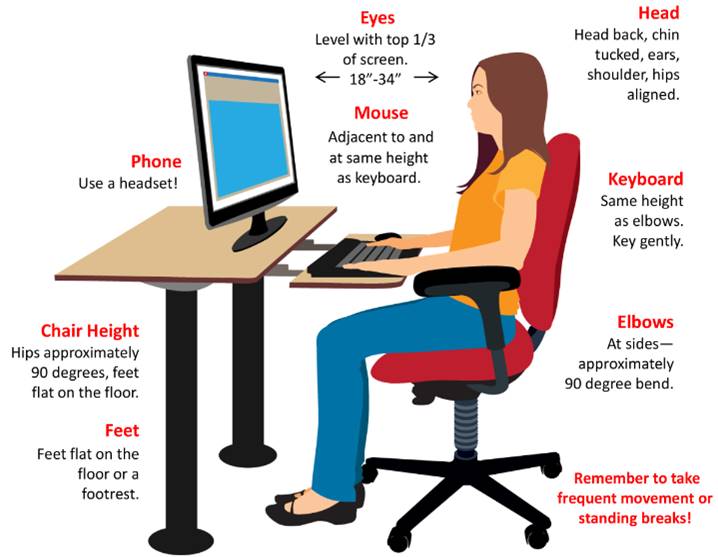
- Position monitors straight ahead with the top third of the screen at or slightly below eye level.
- Keep monitors one arm’s length away to prevent leaning forward to read text.
- Provide adjustable monitor arms or laptop stands to accommodate different users and tasks.
- Encourage employees to use headsets or speakerphone functions instead of cradling phones between the neck and shoulder.
2. Eye Strain and Visual Fatigue
Prolonged screen use can contribute to dry eyes, headaches, blurred vision, and difficulty focusing. Poor lighting, glare from windows or overhead fixtures, and monitors with inadequate brightness or contrast can make these problems worse.
Best Practice:
- Ensure workplace lighting minimizes screen glare and harsh contrasts.
- Position monitors perpendicular to windows whenever possible to minimize glare.
- Give employees control over screen brightness, contrast, and text size.
- Provide education on adjusting display settings to improve visual comfort.
- Encourage employees to follow the 20-20-20 rule (every 20 minutes, look 20 feet away, for 20 seconds) throughout the workday so their eyes can rest and refocus.
3. Shoulder Strain
Like neck strain, shoulder strain can stem from an improper desk setup. The most common causes of shoulder strain in office settings include working with elevated shoulders due to desk and chair height not being properly aligned. Improperly positioned keyboards, computer mice, and other items can also cause workers to hold their arms away from their bodies for long periods, a frequent source of shoulder discomfort.
Best Practice:
- Position keyboards and computer mice close to the body to minimize forward and side reaching.
- Adjust desk, chair, and armrest heights so shoulders remain relaxed and elbows rest close to the body while typing and mousing.
- Keep other frequently used items within easy reach to reduce repetitive reaching.
- Train employees to recognize and avoid elevated shoulder postures while typing and mousing.
- Encourage employees to vary working positions and take brief movement breaks throughout the day.
4. Wrist and Hand Discomfort
Typing, using a computer mouse, and performing other repetitive computer tasks can contribute to strain in the wrists, hands, and forearms. Risk increases when employees bend their wrists upward or sideways, use a poorly fitting mouse, or rest their wrists against hard desk edges.
Over time, repetitive movements and awkward positioning can contribute to conditions such as tendinitis and carpal tunnel syndrome.
Best Practice:
- Provide guides on proper hand and wrist positioning when typing and mousing to avoid bent wrists or resting them on hard surfaces.
- Position keyboards and mice close to the body, near the edge of the desk, and level with the elbows so wrists can remain flat when using them.
- Provide access to appropriately sized mice, ergonomic keyboard options, or height-adjustable keyboard trays when needed.
- Encourage regular breaks and task variation to reduce repetitive loading.
5. Lower Back Pain
Back pain is one of the most recognizable complaints associated with office work. Sitting for extended periods, inadequate lumbar support, poorly adjusted chairs, and leaning forward toward computer screens can all contribute to lower back discomfort.
Staying in the same seated position all day can also increase muscle fatigue and limit opportunities to move.
Best Practice:
- Encourage employees to adjust chair height, seat depth, and recline settings to fit their body dimensions and to support the natural curvature of the spine.
- Ensure employees can maintain feet flat on the floor or on a footrest.
- Provide height-adjustable desks to encourage alternating between sitting and standing throughout the day and to ensure good fit for different workers.
- Encourage regular movement breaks and position changes throughout the day.
6. General Joint Fatigue and Stiffness
Office discomfort is not limited to the back, neck, and wrists. Employees may also experience stiffness in their hips, knees, shoulders, and other joints after spending long periods in relatively static positions. Prolonged sitting, static posture, repetitive tasks, and a lack of healthy habits can contribute to generalized fatigue and discomfort.
Best Practice:
- Encourage employees to take brief movement breaks every 20-40 minutes.
- Incorporate walking meetings, standing discussions, or other opportunities for movement throughout the day.
- Provide sit-stand workstations or other tools that support position changes.
- Educate employees about the effects of prolonged static postures and the benefits of regular movement.
- Consider organization-wide movement initiatives, stretching programs, or wellness challenges to reinforce healthy habits and engagement with office health and ergonomics programs.
Why Office Ergonomics Matters
Addressing individual discomfort is important, but lasting improvements require organizations to examine the conditions that create those problems.
These factors influence how employees interact with their workstations and the physical demands placed on their bodies. When employees are experiencing discomfort or pain, their enthusiasm for work falls. This can lead to lost productivity, job dissatisfaction, and even turnover.
An effective office ergonomics solution fits the workstation and work tasks to the employee rather than expecting employees to adapt to poorly designed environments. This promotes not only a more inclusive workplace, but a workplace that cares about employee health and plans for long-term success.
This means evaluating more than just chair height or monitor placement. Employers should consider how long employees remain seated, how frequently they perform repetitive tasks, whether they have opportunities to change positions, and whether their equipment accommodates different physical needs.
A long-term ergonomics program shows employees you care and signals that your organization is a supportive place to stay and grow.
Three Ways to Create a Healthier Office Environment
An effective office ergonomics strategy combines education, appropriate equipment, and opportunities for movement. Each helps reduce discomfort and prevent minor complaints from becoming bigger problems.
1. Employee Education
Employees should understand how their workstation setup and daily habits influence physical comfort. Ergonomic training can cover proper posture, workstation adjustments, early discomfort reporting, and the importance of taking breaks.
Education also helps employees recognize warning signs such as persistent soreness, tingling, numbness, and reduced range of motion. Reporting these symptoms early gives employers an opportunity to investigate and address potential ergonomic risks.
2. Proper Equipment and Workstation Design
Providing appropriate equipment is essential, but simply purchasing ergonomic chairs or standing desks does not guarantee a healthier workplace. Equipment must be properly selected, adjusted, and incorporated into the employee's daily tasks.
Adjustable chairs, monitor arms, keyboard trays, footrests, and alternative input devices can help accommodate individual needs. Regular workstation assessments can identify equipment gaps and determine whether existing arrangements are contributing to discomfort.
3. Exercises and Movement Breaks
Encouraging movement throughout the day can help employees manage fatigue associated with prolonged sitting and repetitive computer work. Simple activities such as walking, shoulder rolls, gentle stretching, and changing positions can provide opportunities for gradual recovery.
Employers can incorporate brief movement breaks within daily routines and encourage employees to step away from their screens periodically. These activities should complement, rather than replace, improvements to workstation design and task organization.
Building a Proactive Office Ergonomics Program
Preventing office discomfort requires more than responding to complaints after they occur. Employers should regularly evaluate workstation arrangements, identify repetitive or prolonged tasks, and provide employees with the resources needed to work comfortably.
An effective office ergonomics program combines employee education, appropriate equipment, ergonomic assessments, and ongoing opportunities for improvement. By addressing the underlying causes of discomfort, organizations can reduce unnecessary physical strain, support employee productivity, and help prevent work-related musculoskeletal disorders.
Recognizing early warning signs and making practical workplace improvements can make a substantial difference in employee health. A comfortable office is not simply an employee benefit; it is an important part of building a safer and more sustainable workplace.